

Key Details About Liquid Glass in iOS 26
- Feature Name: Liquid Glass
- First Appearance: iOS 26 (2025)
- Developer: Apple Inc.
- Based on: VisionOS-inspired translucent design
- Main Impact: Visual refinement, dynamic interfaces, transparency effects
- Debut Event: WWDC 2025
- Public Beta: Scheduled for July 2025
- Official Site: apple.com/newsroom
Apple’s Liquid Glass in iOS 26 is a deliberate redesign of how digital touchpoints feel, react, and encourage interaction rather than merely a cosmetic update. The images add layers of depth that feel both opulent and intentional, without overpowering what is already familiar. This design language, which is based on the sophisticated visual language of VisionOS, is finally available in iPhones as a noticeably better tactile and visual experience rather than as a gimmick.
By adding a noticeably translucent substance to the interface, liquid glass creates reflections and refractions that react to light and content. It functions similarly to actual glass, glistening at the edges, blending into the background, and changing as needed. In practice, the change is remarkably effective, despite its apparent subtlety. For instance, iOS 26 has made the dock that sits beneath your app icons glow a little bit and blend in with your wallpaper more naturally. This change feels revitalising and subtly futuristic in contrast to the darker, more angular lines of iOS 18.
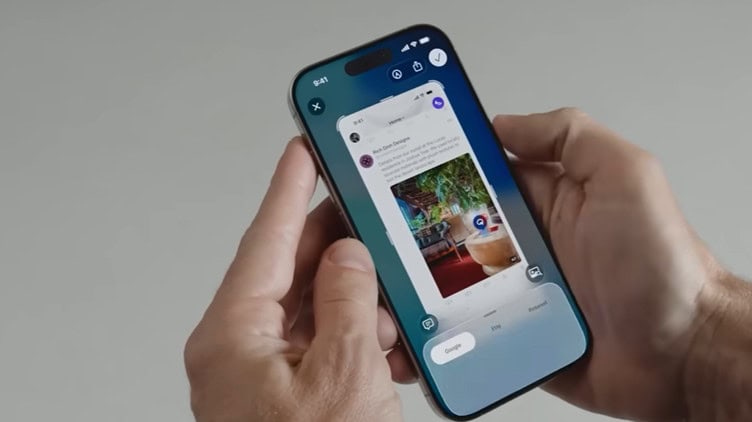
Apple made a striking artistic leap on the lock screen. The gesture has more visual weight because it mimics lifting a pane of polished glass when you swipe up to unlock. The digital clock now dynamically resizes and repositions itself in response to the number of notifications and image contrast. Despite being easily disregarded, this adaptation makes the user experience remarkably transparent and intimate.
Early developer builds over the last few days have shown even more. With delicate, glass-like edges that catch ambient light, icons like Settings and Camera underwent subtle facelifts. Being ostentatious is not the point. The goal is to balance visual rhythm with functionality.
Designers and creatives especially benefit from the change. The new “All Clear” mode makes backgrounds and wallpapers stand out by removing the color from icons. Readability and mood are perfectly balanced when combined with adaptive text that changes from black to white based on what’s behind it. This feature highlights Apple’s dedication to emotionally intelligent design because it remarkably resembles smart design behaviors found in the Vision Pro interface and Apple Watch faces.
What Apple did with Liquid Glass is like using crystal instead of drywall. The phone feels less like a digital panel and more like a glass sculpture, including the control center, menus, and even notifications. iOS 26 creates a UI that feels subtly alive with rounded controls and subtle shadowing. Everything feels purposefully designed, with slower but smoother animations and more rounded control center tiles.
iOS 26 accomplishes something very novel by incorporating motion physics into UI components: spatial depth. This release introduced dynamic tab bars that change size based on how the user scrolls. In addition to saving screen space, this facilitates simpler navigation, particularly in multitasking applications like Safari or Photos. This is very effective for users who are used to switching between tools.
Tech personalities and influencers have already added their voices. In his YouTube review of the update, Marques Brownlee compared the interface to the “calming fluidity of moving water” and praised its emotional resonance. In a viral video, iJustine described how she made her iPhone “my most beautiful iPhone ever” by adding All Clear and a blurred pastel gradient to the lock screen. These opinions are part of a larger trend toward emotionally charged design minimalism.
Apple positioned Liquid Glass at WWDC 2025 as a bridge to more immersive computing as well as a design triumph. The company’s interest in spatial computing was evident in the Vision Pro headset. These spatial metaphors—depth, transparency, and transformation—are now incorporated into regular phone use thanks to iOS 26. This shift goes beyond appearances. It changes the way we engage with our digital gadgets, making them feel more like extensions of our own cadence and rhythm rather than like machines.
Liquid Glass is not Apple’s first daring visual innovation in the field of mobile design. Apple’s consistent approach of advancing visual identity while preserving intuitive usability is exemplified by the skeuomorphic textures of iOS 6, the flatness of iOS 7, and the glistening refinement of iOS 26. The emotional difference is that, in contrast to previous redesigns that frequently shocked or divided, iOS 26 feels like a welcome change.
Apple maintains design coherence without compromising uniqueness by implementing these improvements throughout Messages, Mail, and the Photos app. The Photos app, for example, adds delicate 3D spatial effects that give the appearance of layers in photos, giving the impression that your memories are contained within delicately glowing glass frames. In addition to being aesthetically pleasing, these visual adjustments are incredibly resilient across screen sizes and hardware generations.
Apple has once again demonstrated through strategic design evolution how important visual storytelling is on a phone. A return to clarity and beauty feels surprisingly daring in a time when productivity, AI integration, and backend efficiency are the norm. Liquid Glass is a gentle yet expressive balm for users weary of sterile interfaces or information overload.
Comparisons are also being made by industry insiders. Apple’s version feels more sophisticated and contemplative, but some UI elements seem noticeably influenced by Android’s most recent material design. Though Apple’s method incorporates emotion and tactility in ways that feel particularly elevated, Google’s Android 16 may have been the first to introduce dynamic elements.
The effect is obvious to casual users: your phone simply looks better. However, this is a powerful toolkit for developers, designers, and visual thinkers. When coupled with dynamic transitions and spatial effects, it makes it possible to design interfaces that are emotionally intelligent, motion-sensitive, and light-infused.
Apple’s change may spur comparable adjustments in digital art, user interface design, and even product packaging as this design language develops. The future of digital interaction across disciplines may be significantly impacted by what started out as a visual update for iPhones. At that point, Liquid Glass transforms from a feature to a philosophy.