

| Feature | Details |
|---|---|
| Flashlight Availability | Yes, but only on certain iPad models |
| Compatible Models | iPad Pro (11″ and 12.9″) with rear LED flash (2018 onward) |
| Incompatible Models | Most iPad Air, iPad mini, and base iPad models lack flashlight hardware |
| Activation Methods | Control Center or Siri voice command |
| Brightness Adjustment | Available by long-pressing flashlight icon in Control Center |
| Customization | Add flashlight to Control Center via Settings > Control Center |
| Hardware Requirement | Rear-facing LED flash module |
| Voice Command Example | “Hey Siri, turn on the flashlight” |
| Common Use Cases | Reading in dim spaces, night photography, emergency lighting |
| Official Apple Resource | https://support.apple.com/guide/ipad/turn-the-ipad-flashlight-on-or-off-ipad89644aa3/ipados |
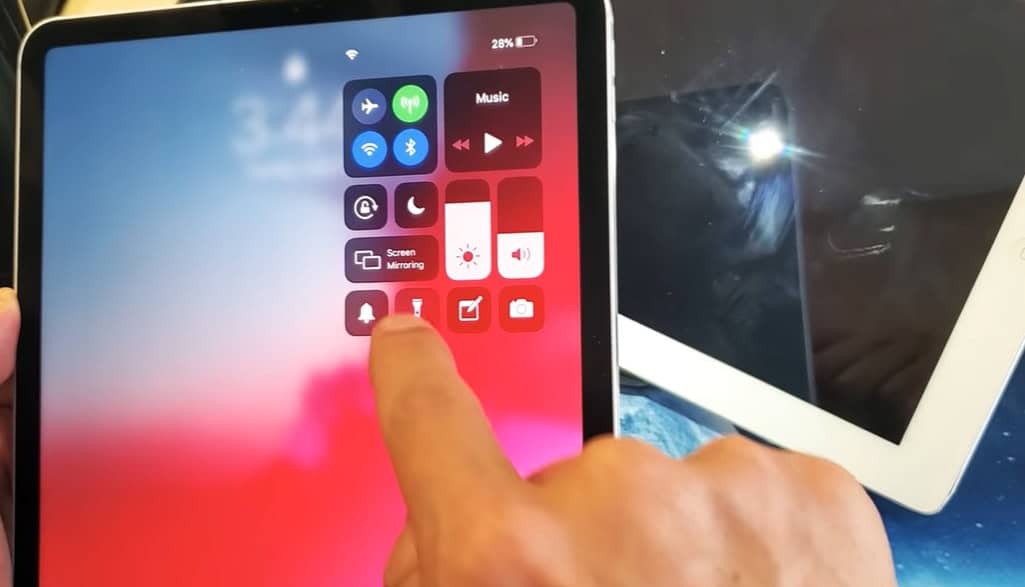
On smartphones, the flashlight is frequently taken for granted, but on iPads, it is much less common—and surprisingly contentious. It can be surprisingly disappointing for iPhone users who are used to swiping down and instantly lighting up their surroundings to find that their iPad does not have this basic feature. However, depending on the specific model you’re holding, the answer to the question “Is there a flashlight on iPad?” can be either yes or no.
Apple has been improving the iPad lineup over the last few years by carefully dividing it into use cases and performance tiers. The flashlight is unquestionably present for anyone holding a recent iPad Pro. It makes use of the same rear LED flash that is integrated into the camera and can be activated through the Control Center or Siri. However, many iPads—especially the iPad mini, standard models, and even some iPad Air variants—glaringly lack this useful feature. They just lacked the hardware required to support flashlight functionality, even with their svelte screens and potent chips.
The omission is strategic rather than merely technical. Apple appears to distinguish between premium and utility, saving some features for its more expensive models. This includes the flashlight, which represents a larger concept of professional readiness despite its small size. The LED flashlight is an additional tool in a small creative kit that is useful for photographers, artists, and creators who frequently shoot in variable lighting.
This flashlight’s iPadOS integration is especially creative. The Control Center is accessible by swiping down from the top-right corner of the screen if you’re using a compatible model. To turn on the flashlight, tap its icon. Press and hold the icon to adjust the beam’s brightness. This incredibly simple and clear interaction mimics the iPhone’s user interface. In this instance, Apple’s user interface design is not only practical but also well-executed.
What happens, though, if you fail to notice that tiny flashlight symbol? Checking the settings is the first step. Make sure Flashlight is included in your active controls by going to Settings > Control Center. It’s incredibly simple to add if it’s missing and you’re using a more recent Pro model. If it’s still absent, your device just doesn’t have the rear LED part that supports it. Software upgrades won’t make that change.
Additionally, Siri is very effective at using the flashlight hands-free. Professionals who might require immediate light during hectic sessions, such as makeup artists and event planners, will especially benefit from this. “Turn on the flashlight” is a quiet voice command that can save crucial seconds. Backstage at fashion shows or late-night talk rehearsals, celebrities like stylists and tech influencers have quietly admitted to using their iPads in this manner.
Workarounds that are surprisingly inexpensive have also surfaced. Although they are only moderately effective, some apps use full-screen white displays at maximum brightness to simulate a flashlight. These are useful in an emergency, but they don’t have the intensity and focus of an actual LED flash. Users tend to rely on their iPhones more often, which raises the question of why all iPads should have flashlights.
This question is frequently brought up by users in Reddit debates and tech forums. One iPad Air user bemoaned their incapacity to even read a map in low light in a particularly lively thread, mockingly referring to the omission as “Apple’s cruel joke.” Putting aside the humor, this commentary captures a deeper sentiment: Apple’s hardware choices influence everyday interactions, sometimes in ways that are surprisingly restrictive.
Nevertheless, Apple tends to emphasize elegance and functionality in its design philosophy. The flashlight is included where Apple deems it appropriate, not just because it is feasible. However, the need for a flashlight has increased due to the growing use of tablets as hybrid tools for travel, media, and photography.
Apple has stepped up its efforts to incorporate gadgets more thoroughly into daily life in recent months. Granular control over things like flashlight beam width or activation with a press is made possible by features like the new Action Button and the Dynamic Island on iPhones. These improvements imply that, in Apple’s ecosystem, lighting—once a secondary utility—now has functional weight.
Apple has made the flashlight smarter—not just present—with deliberate changes in iPadOS. Additionally, the demand for multipurpose devices keeps growing as consumer habits change. Soon, even the basic iPad will get a minor design change that includes a flashlight added subtly but intentionally.
You’re not alone if your iPad doesn’t have a flashlight for the time being, and it doesn’t mean your device is outdated. The iPad Pro is your best option, though, if you value having light close at hand for tasks like finding your keys, sketching in low light, or creating a soft light source for a TikTok. It is especially well-suited for creators who demand that every tool perform multiple tasks.